SMS Opt-In & Messaging Policy
How customers give consent to receive text messages from businesses using mybotbooker.com — and how to opt out at any time.
Last updated: June 2026
mybotbooker.com is an AI operations platform used by small businesses (such as home-services companies, healthcare practices, and professional-services firms) to answer calls, book appointments, and follow up with their customers. Some of that follow-up happens by SMS text message, sent on behalf of the individual business.
We only text people who have given clear, explicit consent. This page explains exactly how that consent is collected and how anyone can opt out.
Sign up for text updates
Enter your mobile number and check the box to opt in to text messages from mybotbooker.com.
How you opt in
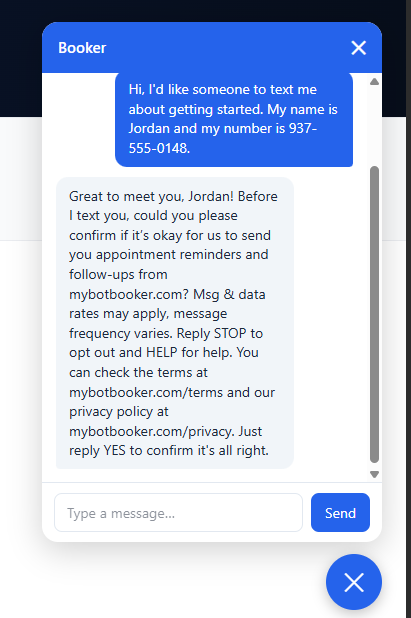
Consent is captured directly in conversation by the business's AI receptionist — there is no pre-checked box and no bundled consent. Before your phone number is ever saved for texting, the assistant asks for your explicit permission and waits for you to agree:
- On the website chat: when the assistant is about to take your mobile number, it shows the consent message below and you must reply YES to confirm.
- On a phone call: the receptionist asks for the same permission out loud and records your verbal "yes" before saving your number.
What you'll see
The assistant asks for your permission in plain, conversational language, always including the required disclosures and the business's name. Here is a real example from mybotbooker.com's own assistant:
You can verify this live: open the chat on mybotbooker.com and ask to be texted — the assistant shows this consent step before taking a number.
What messages you'll get
- Appointment reminders, confirmations, and follow-ups from the business you contacted.
- Message frequency varies based on your interactions with the business.
- Message and data rates may apply. Contact your wireless carrier for details about your plan.
- Consent to receive texts is not a condition of purchasing any product or service.
How to opt out or get help
You can stop messages at any time by replying STOP to any text. You'll get one confirmation message and won't receive any further texts. To resubscribe, reply START. For help, reply HELP, or contact us at [email protected] or (937) 817-3901.
Your consent and your privacy
SMS opt-in data and consent are never shared with third parties or affiliates for marketing or promotional purposes. For full details on how we handle your information, see our Privacy Policy and Terms of Service.